
How to Buy NFTs Directly on Any Marketplace with Credit Card

Quick Summary
Buying an NFT with a credit card is possible when the marketplace has a card-to-NFT checkout system. The payment provider changes your card payment into crypto behind the scenes and sends the NFT to your wallet.
Popular NFT payment providers include MoonPay NFT Checkout, Crossmint, Wert, Transak, Ramp, and other on-ramp services. However, no card provider works on every marketplace automatically.
The marketplace must integrate the provider first. If there is no Debit/Credit Card button on the NFT page, you may need to buy crypto separately and pay with a wallet.
What Is Card-to-NFT Checkout?
Card-to-NFT checkout is a payment system that lets a buyer pay with normal money instead of cryptocurrency.
The buyer enters card details, completes a bank security check, and receives the NFT in a connected wallet. The payment provider handles the crypto conversion and blockchain transaction in the background.
This system is useful for beginners because they do not need to buy ETH, SOL, MATIC, or another crypto asset before buying an NFT.
You can read more beginner-friendly digital asset guides in the Asdullah technology and finance section.
How the Infrastructure Works
- The NFT marketplace adds a card payment provider.
- The buyer opens an NFT listing.
- The buyer clicks Buy Now.
- The checkout asks for a card or mobile wallet payment.
- The provider converts fiat money into the required crypto.
- The blockchain transaction is created.
- The NFT is transferred or minted to the buyer’s wallet.
The buyer sees a normal checkout, but the provider handles many crypto steps behind the scenes.
Main Card-to-NFT Providers
| Provider | Best For | Payment Methods | Main Feature |
|---|---|---|---|
| MoonPay | NFT marketplaces | Visa, Mastercard, Apple Pay, Google Pay | Direct NFT checkout |
| Crossmint | Creators and brands | Cards and local payment methods | Wallet creation and delivery |
| Wert | Marketplace checkout | Visa and Mastercard | Fiat checkout with crypto settlement |
| Transak | Apps and Web3 projects | Cards and local methods | API and wallet integration |
| Ramp | Wallets and apps | Cards, Apple Pay, Google Pay | Embedded Web3 payments |
1. MoonPay NFT Checkout Review
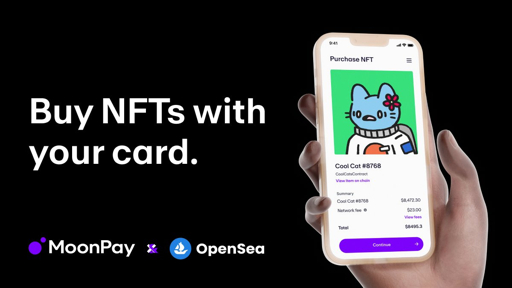
MoonPay NFT Checkout is designed to let users buy NFTs directly with a credit card or debit card.
It can support payment methods such as Visa, Mastercard, Apple Pay, Google Pay, bank transfers, and selected local payment methods, depending on the country and marketplace integration.
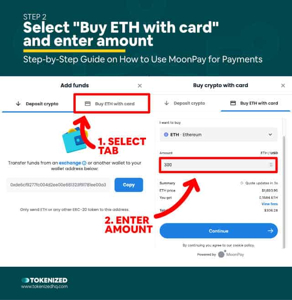
The user selects an NFT, clicks Buy, enters payment details, completes verification, and receives the NFT in a wallet. MoonPay handles the fiat-to-crypto conversion and blockchain payment in the background.
MoonPay is useful for marketplaces that want to give non-crypto users a simple checkout experience. Developers can review the MoonPay developer resources for integration details.
OpenSea uses MoonPay for eligible card purchases in supported regions. Buyers can read the MoonPay NFT buying guide for the general process.
Best for: NFT marketplaces that want a plug-and-play card checkout.
2. Crossmint Review
Crossmint focuses on making NFTs easier for brands, creators, games, and online businesses.
Crossmint can help users buy NFTs with cards without first buying cryptocurrency. It can also create or manage a wallet for users who are new to blockchain.
This is useful for businesses that want a normal shopping experience. A customer can pay with a card while Crossmint handles the NFT delivery behind the scenes.
Developers can explore the Crossmint documentation for APIs, checkout tools, wallets, and NFT delivery features.
Crossmint is often a good option for branded NFT drops because the user experience can look more like a normal online store than a crypto exchange.
Best for: Brands, creators, games, NFT drops, and users without a crypto wallet.
3. Wert Review
Wert provides fiat checkout infrastructure for NFT marketplaces and Web3 applications.
It can allow users to pay with Visa, Mastercard, Apple Pay, and other supported methods while the provider settles the blockchain transaction.
Wert is useful when a marketplace wants to keep its own NFT buying page but add card payments in the background.
Buyers may need to complete one-time verification before using the card option. Always review the checkout fee, service fee, network fee, and exchange rate.
Creators and developers can review the Wert developer page before choosing the service.
Best for: Marketplaces that need a simple fiat checkout widget.
4. Transak Review
Transak is a fiat-to-crypto payment gateway for Web3 wallets, applications, games, and blockchain platforms.
Transak can support card payments and local payment methods in selected countries. Its main strength is its API and developer integration system.
A marketplace can use Transak to let users buy the required crypto before purchasing an NFT. In some setups, the user may be able to complete the whole process inside the marketplace.
Developers can read the Transak documentation and users can check the Transak support center.
Transak is a strong choice for marketplaces that need more control over payment flows, wallets, and supported blockchain networks.
Best for: Developers, Web3 applications, games, and multi-chain NFT projects.
5. Ramp Review
Ramp Network provides payment infrastructure for wallets, Web3 apps, games, and decentralized platforms.
It may support Visa, Mastercard, Apple Pay, Google Pay, bank transfers, and other local methods in supported markets.
Ramp is useful when an NFT marketplace wants users to buy crypto inside the app instead of leaving the website to visit an exchange.
Developers can review the Ramp Network documentation for API, widget, and integration information.
Best for: Wallets, gaming platforms, NFT apps, and embedded Web3 checkout.
How to Buy an NFT with a Credit Card
- Open an NFT marketplace that supports card checkout.
- Create an account or connect your crypto wallet.
- Find the NFT you want to buy.
- Check the collection and creator carefully.
- Click Buy Now or Purchase.
- Select Credit Card or Debit Card.
- Enter your email and billing details.
- Complete identity verification if requested.
- Review the NFT price and all fees.
- Confirm the payment.
- Approve the wallet transaction if required.
- Wait for the NFT to arrive in your wallet.
The exact steps can look different on OpenSea, Magic Eden, Rarible, Nifty Gateway, and other marketplaces.
You can read the official OpenSea card buying guide for an example of a supported checkout flow.
Marketplaces That May Support Card Checkout
OpenSea supports card checkout for eligible NFTs in supported regions.
Magic Eden has worked with payment infrastructure providers to make card purchases possible for selected NFT collections and networks.
Rarible may support card purchases through integrated payment providers on selected collections.
Nifty Gateway offers a more beginner-friendly, fiat-focused NFT experience for supported drops.
Card checkout is not guaranteed on every marketplace or NFT. Look for a Debit/Credit Card button before entering payment information.

Fees in Card-to-NFT Checkout
- NFT marketplace fee.
- Payment provider fee.
- Card processing fee.
- Blockchain network fee.
- Currency conversion fee.
- Wallet creation fee, if applicable.
The amount shown on the NFT listing page may not be the final amount charged to your card. Always review the complete checkout total.
Why Card Checkout May Not Appear
- The marketplace has not integrated a card provider.
- The selected NFT does not support card checkout.
- Your country is not supported.
- Your card issuer blocks NFT or crypto payments.
- The selected blockchain is not supported.
- The NFT is being sold through an auction or offer system.
- The payment provider requires identity verification.
If the card option is not available, you may need to buy ETH, SOL, MATIC, or another supported cryptocurrency first.
Security Tips
- Use the official marketplace website.
- Check the spelling of the website address.
- Verify the collection and creator.
- Never share your wallet recovery phrase.
- Do not sign unknown wallet transactions.
- Do not trust random NFT support accounts.
- Start with a small purchase.
- Save your payment receipt and transaction hash.
For general online security, read the CISA cybersecurity guidance.
Credit Card vs Crypto Wallet Payment
| Feature | Credit Card | Crypto Wallet |
|---|---|---|
| Easy for beginners | Yes | Requires crypto knowledge |
| Extra payment fee | Usually possible | Usually lower |
| Speed | Fast if supported | Depends on wallet balance |
| Availability | Country and provider dependent | Usually available if network is supported |
FAQ
Can I buy any NFT with a credit card?
No. The marketplace and NFT must support card checkout through an integrated payment provider.
Which provider is best for NFT card checkout?
MoonPay is well known for direct NFT checkout. Crossmint is useful for creators and brands, while Wert, Transak, and Ramp are useful for marketplace and app integrations.
Do I need a crypto wallet?
Usually yes, but some providers can create or manage a wallet for new users.
Can I use Visa or Mastercard?
Many providers support Visa and Mastercard in selected countries.
Can I use Apple Pay or Google Pay?
Some providers support Apple Pay or Google Pay, but the option depends on the marketplace, country, and payment provider.
Are card-to-NFT payments instant?
Payment approval can be fast, but identity checks and blockchain confirmation may take longer.
Are card NFT purchases more expensive?
They can be more expensive because card processing, provider, marketplace, and blockchain fees may all apply.
Risk Warning
NFT prices can fall quickly, and some NFTs may become difficult to sell. A card purchase does not guarantee that the NFT will increase in value.
Credit card purchases may also include interest, cash-advance charges, and extra fees. Do not spend money needed for bills, rent, food, or debt payments.