How to Buy NFTs with Credit Card on OpenSea Using MoonPay
Quick Summary
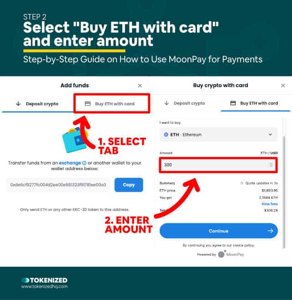
OpenSea allows eligible users to buy some NFTs with a credit card or debit card. The card payment is processed through MoonPay, so you may not need to own crypto before starting the purchase.
You still need a compatible crypto wallet. After you click Buy Now, connect your wallet, select Debit/Credit Card, complete the MoonPay checkout, and confirm the transaction through your wallet.
Card support is not available for every NFT, country, wallet, or payment method. If the card option does not appear, you may need to buy crypto separately and pay with your wallet balance.
What You Need
- An OpenSea account or connected crypto wallet.
- A compatible wallet such as MetaMask or another supported wallet.
- A valid Visa or Mastercard credit or debit card.
- An email address for MoonPay verification.
- Enough money for the NFT price, network fee, and card processing fee.
You can learn more about wallets in this crypto wallet guide on Asdullah.
Step 1: Open the Official OpenSea Website
Start by opening the official OpenSea website. Check the website address carefully before connecting your wallet.
NFT scams are common. Avoid links sent by random users on Telegram, Discord, email, or social media. Bookmark the official OpenSea website so you do not accidentally visit a fake copy.
You can also read the official OpenSea NFT buying guide before starting.
Step 2: Connect Your Crypto Wallet
Click the profile or wallet button on OpenSea. Select your wallet from the available options and approve the connection.
- Open the OpenSea profile menu.
- Click Connect Wallet.
- Select MetaMask or another supported wallet.
- Unlock your wallet.
- Approve the connection request.
OpenSea does not need your wallet recovery phrase. Never type your seed phrase into a website or send it to support.
Step 3: Find an NFT
Search for an NFT collection or browse the OpenSea marketplace. Always check that you are viewing the official collection and not a copy.
- Search for the NFT collection.
- Open the collection page.
- Check the creator details and collection activity.
- Review the NFT image, name, price, and network.
- Look for a Buy Now button.
Do not buy an NFT only because someone promises quick profits. NFT prices can fall quickly, and some collections have very low trading activity.
Step 4: Click Buy Now
When you find the NFT you want, click the Buy Now button. OpenSea will show the checkout screen and available payment methods.
Some NFTs support direct card checkout, while others only accept cryptocurrency. If the card option is available, select Debit/Credit Card and continue.
You can also read OpenSea’s official guide about buying fixed-price NFTs.
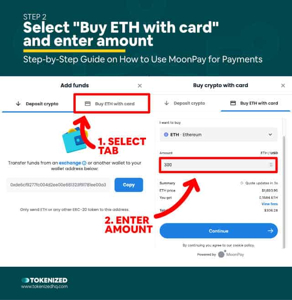
Step 5: Select Debit or Credit Card
Choose the card option in the OpenSea checkout window. OpenSea may open a MoonPay payment screen for the next steps.
MoonPay can support major payment methods such as Visa and Mastercard in supported locations. Some purchases may also support Apple Pay or Google Pay.
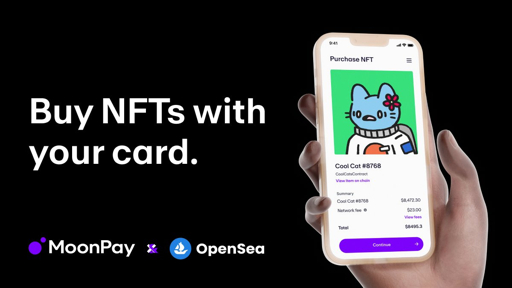
You can read the MoonPay NFT buying guide for more information about payment details and verification.
Step 6: Verify Your Email and Identity
MoonPay may ask you to verify your email address before completing the purchase. It may also request personal information or identity verification.
- Enter your email address.
- Open the verification email.
- Confirm your email.
- Enter your billing information.
- Complete identity verification if requested.
Verification requirements can change depending on your country, card, transaction size, and payment risk. Do not try to use false information or someone else’s card.
Step 7: Review All Fees
Before clicking Pay, review the complete price. The final total may be higher than the NFT listing price.
- NFT listing price.
- Blockchain network or gas fee.
- MoonPay card processing fee.
- Currency conversion fee.
- Possible wallet or marketplace fee.
OpenSea explains that the total can include network fees and card processing fees. Always check the fee breakdown before confirming the payment.
Step 8: Enter Your Card Details
- Enter your card number.
- Enter the expiry date.
- Enter the security code.
- Enter your billing address.
- Complete your bank’s security approval.
Use only the official MoonPay checkout window opened from OpenSea. Never enter card details in a message, social media form, or unknown website.
Step 9: Confirm the Purchase in Your Wallet
After you submit the card payment, OpenSea may send the transaction instructions to your connected wallet.
- Open the wallet confirmation window.
- Check the NFT name and transaction details.
- Review the network fee.
- Approve the transaction.
- Wait for blockchain confirmation.
The card payment and blockchain transaction are separate steps. A successful card payment does not always mean the NFT appears immediately.
Step 10: Check Your NFT
After the transaction is confirmed, open your OpenSea profile and check the Collected or Owned section.
You can also check the transaction on the correct blockchain explorer. For example, use Etherscan for Ethereum transactions, PolygonScan for Polygon, or Solscan for Solana.
If the NFT does not appear immediately, wait for confirmation and refresh your wallet or OpenSea profile.
Which NFTs Support Card Checkout?
Not every NFT on OpenSea can be purchased directly with a credit card. Card checkout depends on the collection, blockchain, seller settings, country, wallet, and payment provider.
MoonPay has supported card purchases for selected NFTs on Ethereum, Solana, and Polygon. However, the available option can change. The best way to check is to open the NFT page and look for the Debit/Credit Card option at checkout.
If you only see a crypto payment option, you will need to fund your wallet with ETH, SOL, MATIC, or another supported asset before purchasing.
Credit Card vs Crypto Payment
| Feature | Credit Card | Crypto Wallet Balance |
|---|---|---|
| Easy for beginners | Yes | Requires crypto knowledge |
| Extra processing fee | Usually possible | Usually lower payment cost |
| Identity check | May be required | Depends on wallet and funding source |
| Speed | Fast if supported | Depends on blockchain balance |
Common Problems
- Card option is not available for the selected NFT.
- MoonPay asks for additional identity verification.
- Your bank declines the card payment.
- The NFT is on an unsupported network.
- Your wallet does not support the selected blockchain.
- The payment succeeds but blockchain confirmation is delayed.
- The final price is higher because of fees.
If your payment fails, visit the official OpenSea Help Center or MoonPay Support Center.
NFT Safety Tips
- Use only the official OpenSea website.
- Check the collection name and creator details.
- Do not click unknown NFT links from social media.
- Never share your wallet recovery phrase.
- Do not sign unknown wallet transactions.
- Check the NFT contract and blockchain network.
- Start with a small purchase.
- Do not buy an NFT only because someone promises profit.
OpenSea also provides safety information in its security and safety section.
FAQ
Can I buy an NFT on OpenSea with a credit card?
Yes, some supported NFTs can be purchased with a credit or debit card through MoonPay.
Can I use Visa or Mastercard?
Visa and Mastercard may be supported for eligible purchases and countries.
Do I need a crypto wallet?
Yes. You need a compatible wallet because the NFT is delivered to your wallet after the transaction.
Do I need ETH before buying an NFT with a card?
Not always. If the NFT supports card checkout, MoonPay may handle the crypto conversion. You may still need to connect and approve the transaction through a wallet.
What is MoonPay?
MoonPay is a payment provider that can process card purchases for supported crypto and NFT transactions.
Why is the card option missing?
The NFT, network, country, wallet, or payment provider may not support direct card checkout.
Are NFT card purchases instant?
The card payment can be fast, but identity checks and blockchain confirmation may take longer.
Are there extra fees?
Yes. You may pay a MoonPay processing fee, blockchain gas fee, currency conversion fee, or other marketplace fee.
Risk Warning
NFT prices can change quickly, and some NFTs may become difficult to sell. A card purchase does not guarantee that the NFT will increase in value.
Credit card purchases may include interest, cash-advance fees, and payment charges. Do not spend money needed for bills, rent, food, or debt payments. This article is for general information only and is not financial advice.
Conclusion
Buying an NFT with a credit card on OpenSea is possible when the